• Learner
  • Course administrator
  • Reports
  • Administrator
  • Finnish
  • English
  • Learner
  • Course administrator
  • Reports
  • Administrator
  • Finnish
  • English
Generic selectors
Exact matches
Search title
Search content
Post Type Selectors

Priima 4.19 Release Notes

We will update Priima to version 4.19 on Wednesday, 11 November 2026 at 18:00 (UTC+2).

Contents

  • Multilingual support for courses
  • Require a code to join a course
  • Automatically send the certificate to the learner by email
  • Defining the default validity period for competencies in days
  • Moving to Priima 5

Multilingual support for courses

It is now possible to create several language versions of a course. This allows the same course to be offered to learners in different languages without having to create separate versions of the course. Learners can also switch the course language version while studying.
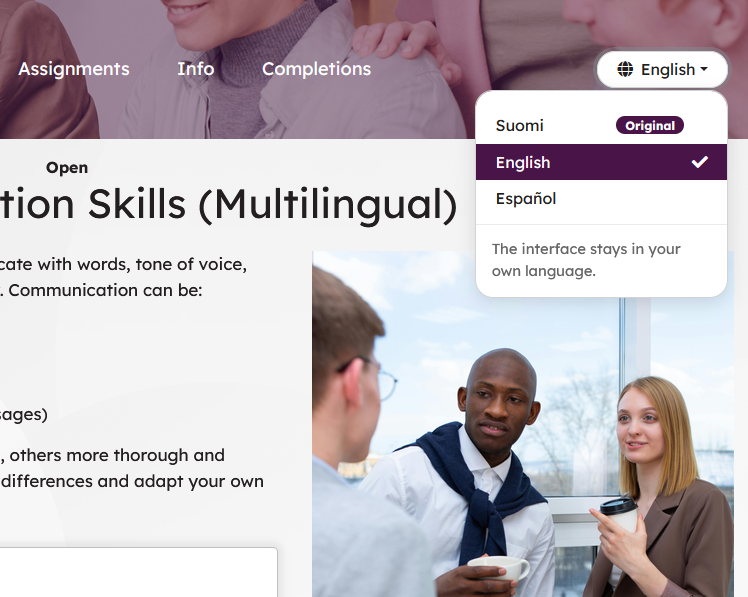
Course language selection menu, where the learner can switch between Finnish, English and Spanish language versions while the interface language remains unchanged.

Course content can be translated manually in the translation editor, using the export and import functions or with AI assistance. This also allows text content to be translated using an external translation service, for example. The text content can be exported from Priima as a file, translated outside Priima and then imported back into Priima as a translated file. When using AI-assisted translation, it is important to review the translation before opening the course to learners.
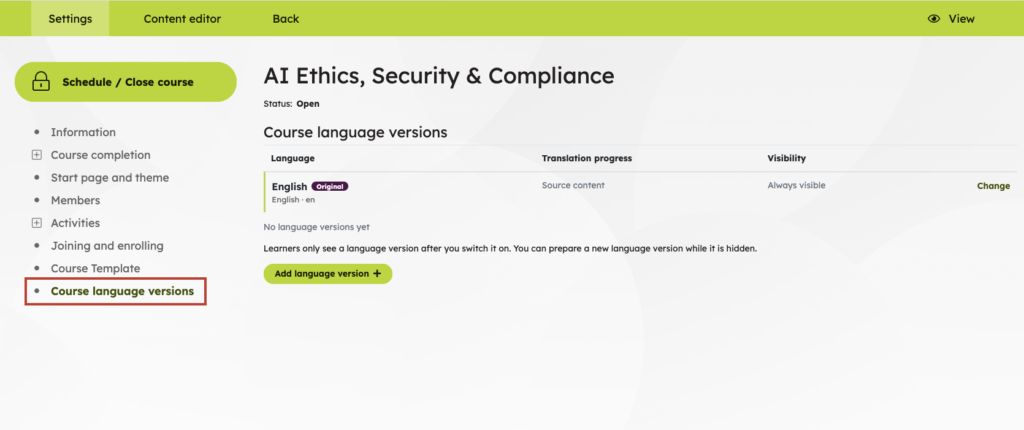
Course language versions settings, where the course administrator can add and manage language versions of the course.

If you are using the free AI features, AI-assisted translation will automatically be included in your trial until the end of 2026. After this, AI-assisted translation will be available as an additional paid service.

Sign up to try Priima’s AI-assisted features HERE.


Require a code to join a course

Course administrators can now restrict access to a course to learners who have been given a joining code. This feature is particularly useful for courses intended for specific customers or target groups where the content should not be available to all users, while still keeping the joining process straightforward for learners and easy to manage for administrators.

The Protect course joining with a code setting can be enabled for each course under Joining and enrolling in the course settings, as a sub-setting of Direct joining. The code can be generated automatically, changed when necessary and copied for sharing. The code can consist of:

  • at least 3 characters,
  • no more than 12 characters,
  • uppercase letters only (A–Z, Ä, Ö, Å), and
  • numbers (0–9).

Changing the code does not affect existing course members or valid completions. Only new learners or learners rejoining the course need the new code.
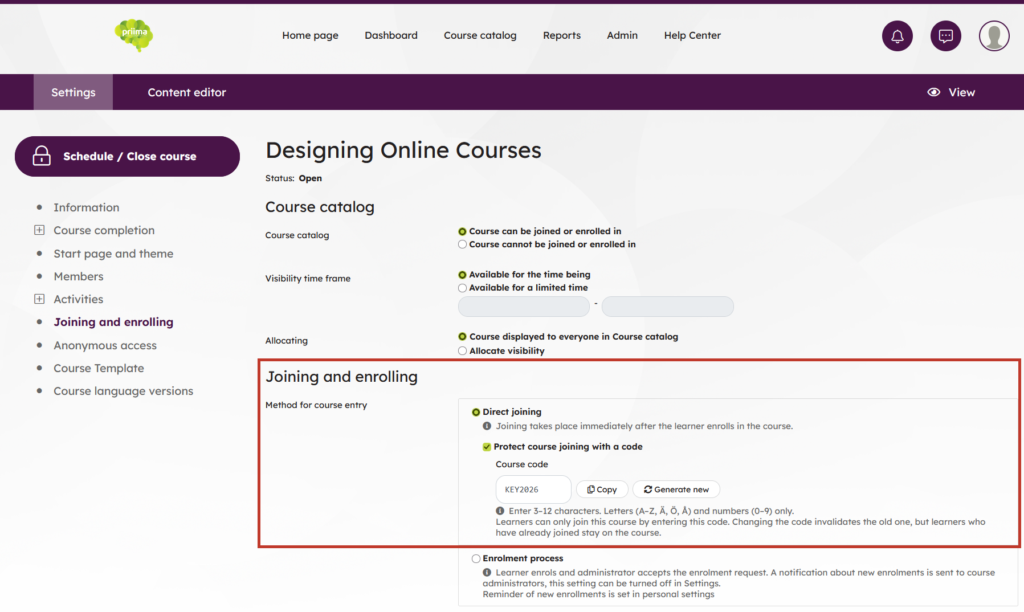
Joining and enrolling settings, where the course administrator can enable direct joining and protect access to the course with a course code.

When joining with a code is enabled, a Join with code button is shown to learners on the course card and course information page. The learner can join the course by entering the code.
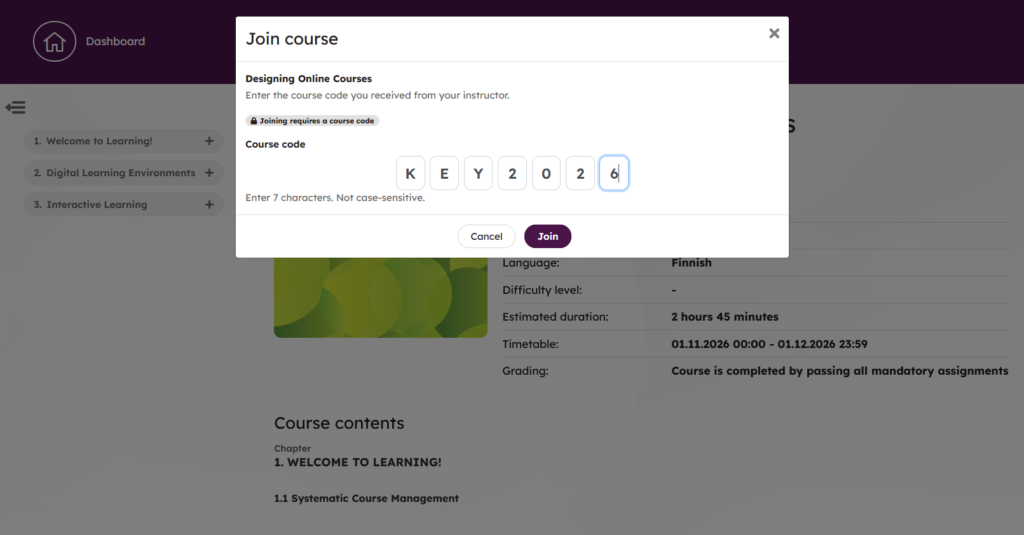
Join course dialogue, where the learner enters the required course code to join the course.

Automatically send the certificate to the learner by email

Course administrator can now enable a course-specific setting that automatically sends the certificate to the learner by email when the course has been completed. The certificate can still also be downloaded from the course and from the My completions section.

Automatic certificate sending can be enabled in the course settings on the Certificate tab under Course completion. When a completion is added manually for a learner, the administrator can choose whether the certificate is sent to the learner by email.
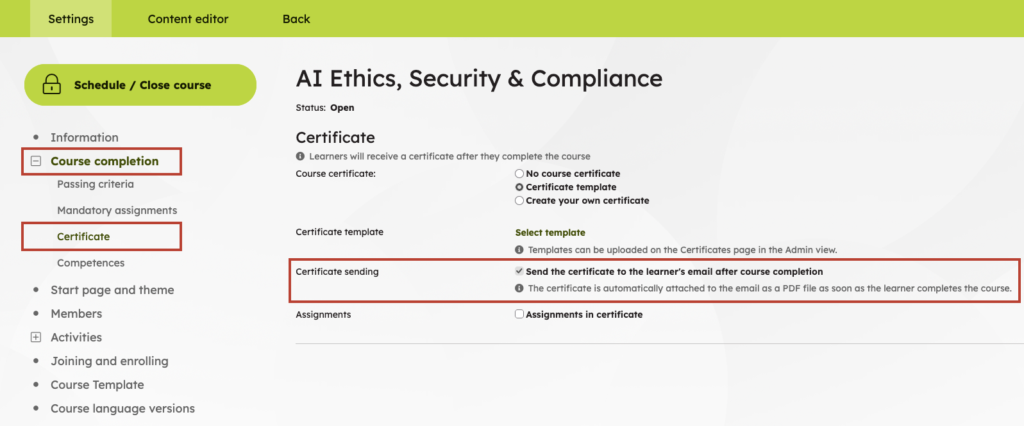
Certificate settings, where the course administrator can enable automatic sending of the certificate to the learner’s email after course completion.

Defining the default validity period for competencies in days

Environment administrator can now also define a default validity period for a competency in days. This allows several competencies with different validity periods to be earned from the same course. Competencies linked to courses are now displayed on course cards. Learners can find their earned competencies in the Competencies section, accessible via their profile picture. Competencies is an additional Priima service.


Moving to Priima 5

Customers using learning paths, Open Badges or both can now move to Priima 5. If you need any assistance, you can contact us at info@saarnilearning.fi.

 
  • + Environment administration
    • Priima 4.18 release notes
    • Priima 5.0 release notes
  • + Course activities
    • Journal assignment
    • Image carousel assignment
    • Event
    • Group assignment
    • Form
    • Test
    • Follow-up assignments
    • Turn-in assignments
    • Course feedback
    • Types of content in a course
    • Discussion assignments
    • Course message board
  • + Guidelines for instructors
    • My teaching
    • Image guidelines
    • Manage / Learn switch
    • Use of the service
    • Learning, Teaching and Guidance
    • Instructor's Dashboard
    • Result monitoring and guidance
    • Frequently Asked Questions
  • + General instructions
    • Environment's tests and question databases
    • Notification texts
    • Priima Helpdesk
    • Image guidelines
    • Priima support services
    • Integrations
    • Service documentation
    • Release notes
    • Frequently Asked Questions
  • + Service documentation
  • + Progress and completions
    • Adding course activities to your own external calendar as a learner
    • Completing the course again
    • Required course
    • Certificate
    • Mandatory assignments
    • Open badges
    • Progress in the course
    • Course completion
    • Monitoring your progress
  • + Course administration
    • SCORM Micro-course
    • Duplicating a course
    • Opening and closing a course
    • Adding course activities to your own external calendar as a instructor
    • Micro course
    • Mandatory assignments
    • Setting a required course
    • Announcements
    • Deletion of course completions
    • Adding course results
    • Completing the course several times
    • Course catalog: Joining and registration
    • Course template
    • Course feedback settings
    • Course completion settings
    • Course settings
    • Message board
    • Member administration
    • Start page and theme
    • Course owner, instructor and administrator
    • Creating a new course
  • + General instructions for students
    • Pinning course to favorites
    • Setting a course as favorite
    • Setting a course as favore
    • Setting a course as favorite
    • My learning
    • Message center
    • My profile
    • Start page
    • Notification icons
    • External login methods
    • Self-registration
    • Strong authentication
    • Login to the service
    • Chat messages
    • Dashboard screen
    • My courses and assignments
    • Materials
  • + Reports
    • Saved reports management
    • Registration statistics
    • Open badge reports
    • Course feedback reports
    • User reports
    • Course reports
  • + Participation in courses
    • Pinning course to favorites
    • Setting a course as favorite
    • Setting a course as favore
    • Setting a course as favorite
  • + Establishing courses
  • + Monitoring reports
  • + Environment administration
    • Priima 4.19 Release Notes
  • + Courses
    • Task templates
    • Using H5P Assignments in the Environment
    • Sharing courses
    • LTI 1.3 tools
    • Events
    • Recommendations
    • Learning path administration
    • Course types
    • Color themes
    • Certificates
    • Open badges
    • LTI tools (versions 1.0 and 1.1)
    • Course feedback
    • Grading
    • Courses and course templates
  • + Users
    • Activating an expired user account
    • Creating an account
    • Creating a user account
    • Creating a user account
    • Creating a user account
    • Creating a user account
    • Account validity and deletion
    • Users
    • Edit and delete multiple accounts
    • Account deletion
    • Accounts which are no longer valid
    • Choosing landing page for a group
    • Adding manager information
    • Dynamic groups
    • Permission levels
    • Groups
    • Roles
    • Terms of Use
    • User data fields
    • Create multiple accounts at once
  • + Environment statistics
    • Usage
    • Statistics
  • + Materials
    • Question database
    • Management of Materials
    • Preparing tests
  • + Manager: Team results
    • Recommending course for team member
    • Multi-level team report
    • My team’s accomplishments
    • Adding team member to course
  • + Environment
    • Security settings
    • Search engine optimization of the login page
    • Start pages
    • Priima Switch: Priima as LTI Tool Provider
    • Emails sent by Priima
    • Chat Messages and eMail Reminders
    • Embedding content
    • Layout settings
    • Tags
    • Environment settings
  • + Learning paths
    • The principles of completing the learning path and modifying the path
    • Tracking progress of learning path completions
    • Managing members of the learning path
    • Creating a learning path
  • + General instructions
    • Saved report
  • + Learning Paths
    • Choosing a course on a learning path
    • Learning path completion
  • + Content and assignments in the course
    • H5P assignment
    • Journal
    • Image carousel
    • Import content from file
    • Event
    • Form
    • Video and audio
    • External content
    • File and image
    • Test
    • Text content
    • Embedded content
    • Follow-up
    • SCORM
    • LTI tool
    • Discussion
    • User card
    • Content editor
    • Turn-in assignment
  • + login
    • Tax number registration
    • SSO login
    • Login page settings
    • Valtticard login
    • Strong authentication
    • External login methods
    • Registration
    • Login page announcements
  • + Course catalogue
    • Open Badges
    • Enrollment for a course
    • Joining a course
    • Course catalogue