• Learner
  • Course administrator
  • Reports
  • Administrator
  • Finnish
  • English
  • Learner
  • Course administrator
  • Reports
  • Administrator
  • Finnish
  • English
Generic selectors
Exact matches
Search title
Search content
Post Type Selectors

Priima 4.18 release notes

We updated Priima to version 4.18 on 10 June 2026 at 18:00. This update was rolled out automatically to all customers.

Contents:

  • Changing home page order
  • New permission-level feature: Users cannot edit their own information
  • Recommendation for displaying SCORM content on a course
  • Other improvements

Changing home page order

The environment administrator can now arrange home pages in any preferred order through administration. This order determines which home page appears first when more than one home page is targeted to the same group. For example, if there is a shared home page for all learners and a separate one for managers, the manager home page can now be moved to the top. Previously, home pages appeared in creation order and their order could not be changed.
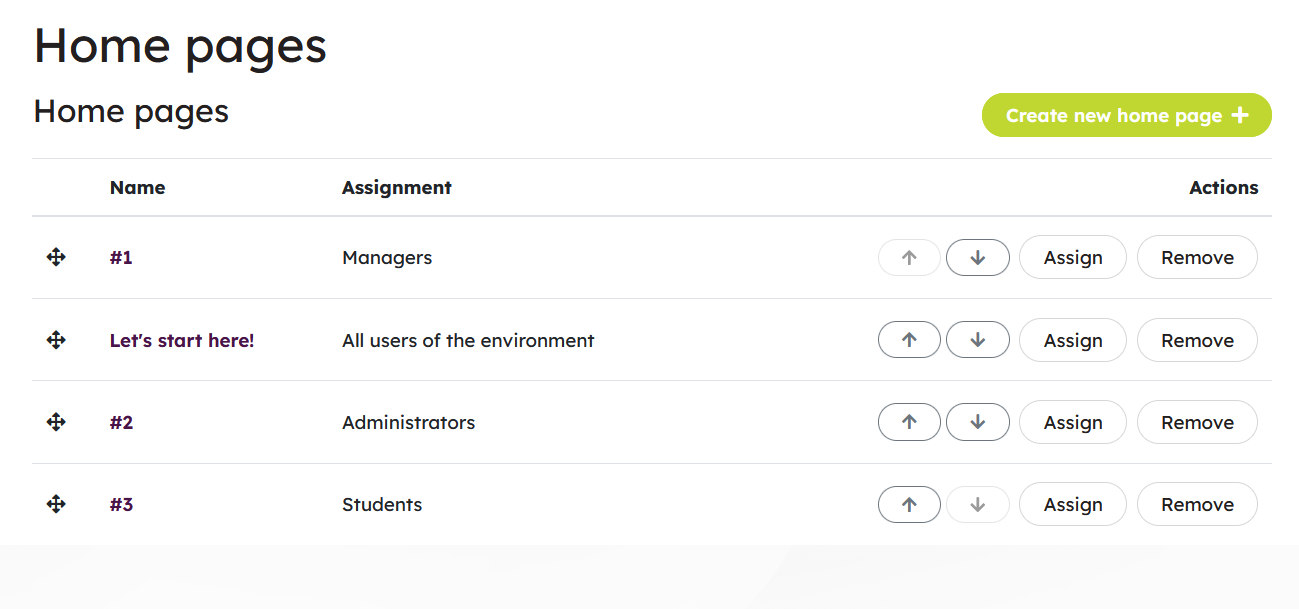
Changing home page order

Home pages can be re-arranged by dragging or clicking the arrow buttons.


New permission-level feature: Users cannot edit their own information

The environment administrator can now remove a user’s ability to edit their own information by using a new permission-level setting. A new option, User cannot edit their own details, is now available at the permission level. By default, it is not selected.

This change cannot be made to Priima’s locked default permission levels, but permission levels created by the environment administrator can be edited immediately after the update if needed.
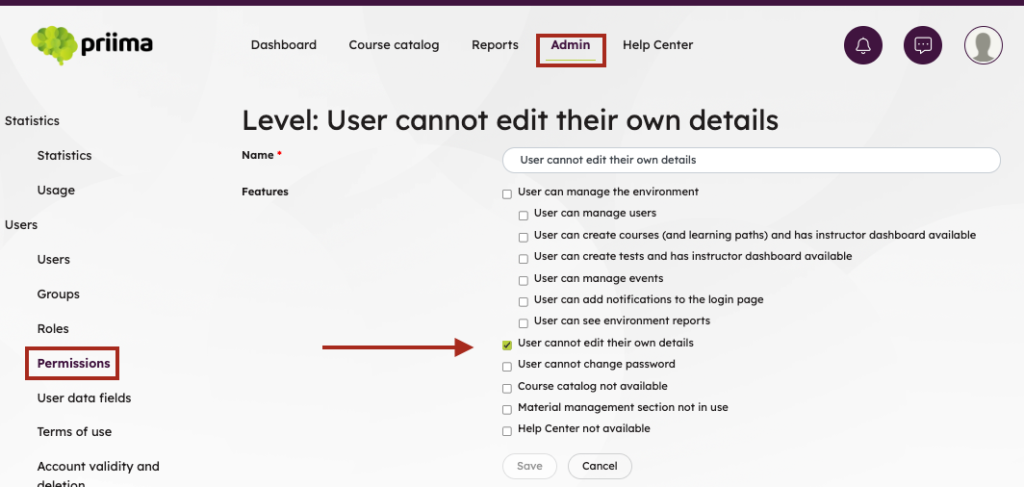
New permission-level feature: Users cannot edit their own information

If a registration form is used in the environment, the user can still edit the personal information included on the form by logging in through the registration form.


Recommendation for displaying SCORM content on a course

To ensure operational reliability going forward, we recommend setting the SCORM package to open either in the main view or directly on the content page.
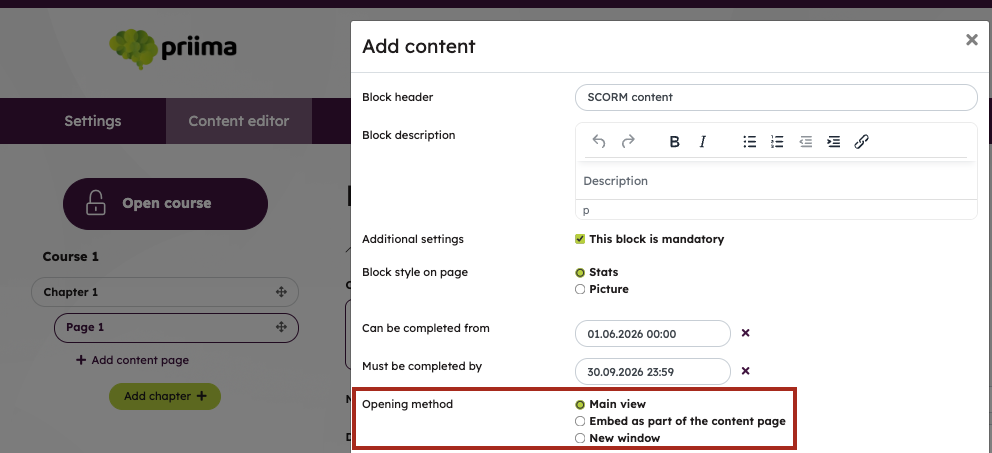
Recommendation for displaying SCORM content on a course

Other improvements

REST API

  • Course metadata now also includes the keywords set for courses, and learner completion data now indicates whether the course is a required course for the learner.
  • When creating or updating a user, it is now possible to send an email containing user account information and to reset the user’s password after a defined period of inactivity.
  • Support has been added for retrieving the latest competencies and their metadata for one user, multiple users, or all users in an environment.
  • The course report API (assignments_report) now supports pagination to improve performance, returning users in a more controlled way and preventing uncontrolled response size growth. This change is backward compatible for existing integrations.

Term changes

Changes to Finnish terms

The Finnish term corresponding to Tulos has been replaced, depending on context, with terms meaning Suoritus or Arviointi.

Changes to English terms

Old termNew term
User dataUser data field
SupervisorManager
Start pageHome page
EvaluateAssess
Result (course completion)Completion (course level)
Educator, TrainerInstructor

Do you have any questions about the content of the update? You can contact us!

Kind regards

Team Priima

Contact us

 
  • + Environment administration
    • Priima 4.18 release notes
    • Priima 5.0 release notes
  • + Course activities
    • Journal assignment
    • Image carousel assignment
    • Event
    • Group assignment
    • Form
    • Test
    • Follow-up assignments
    • Turn-in assignments
    • Course feedback
    • Types of content in a course
    • Discussion assignments
    • Course message board
  • + Guidelines for instructors
    • My teaching
    • Image guidelines
    • Manage / Learn switch
    • Use of the service
    • Learning, Teaching and Guidance
    • Instructor's Dashboard
    • Result monitoring and guidance
    • Frequently Asked Questions
  • + General instructions
    • Environment's tests and question databases
    • Notification texts
    • Priima Helpdesk
    • Image guidelines
    • Priima support services
    • Integrations
    • Service documentation
    • Release notes
    • Frequently Asked Questions
  • + Service documentation
  • + Progress and completions
    • Adding course activities to your own external calendar as a learner
    • Completing the course again
    • Required course
    • Certificate
    • Mandatory assignments
    • Open badges
    • Progress in the course
    • Course completion
    • Monitoring your progress
  • + Course administration
    • SCORM Micro-course
    • Duplicating a course
    • Opening and closing a course
    • Adding course activities to your own external calendar as a instructor
    • Micro course
    • Mandatory assignments
    • Setting a required course
    • Announcements
    • Deletion of course completions
    • Adding course results
    • Completing the course several times
    • Course catalog: Joining and registration
    • Course template
    • Course feedback settings
    • Course completion settings
    • Course settings
    • Message board
    • Member administration
    • Start page and theme
    • Course owner, instructor and administrator
    • Creating a new course
  • + General instructions for students
    • Pinning course to favorites
    • Setting a course as favorite
    • Setting a course as favore
    • Setting a course as favorite
    • My learning
    • Message center
    • My profile
    • Start page
    • Notification icons
    • External login methods
    • Self-registration
    • Strong authentication
    • Login to the service
    • Chat messages
    • Dashboard screen
    • My courses and assignments
    • Materials
  • + Reports
    • Saved reports management
    • Registration statistics
    • Open badge reports
    • Course feedback reports
    • User reports
    • Course reports
  • + Participation in courses
    • Pinning course to favorites
    • Setting a course as favorite
    • Setting a course as favore
    • Setting a course as favorite
  • + Establishing courses
  • + Monitoring reports
  • + Environment administration
  • + Courses
    • Task templates
    • Using H5P Assignments in the Environment
    • Sharing courses
    • LTI 1.3 tools
    • Events
    • Recommendations
    • Learning path administration
    • Course types
    • Color themes
    • Certificates
    • Open badges
    • LTI tools (versions 1.0 and 1.1)
    • Course feedback
    • Grading
    • Courses and course templates
  • + Users
    • Activating an expired user account
    • Creating an account
    • Creating a user account
    • Creating a user account
    • Creating a user account
    • Creating a user account
    • Account validity and deletion
    • Users
    • Edit and delete multiple accounts
    • Account deletion
    • Accounts which are no longer valid
    • Choosing landing page for a group
    • Adding manager information
    • Dynamic groups
    • Permission levels
    • Groups
    • Roles
    • Terms of Use
    • User data fields
    • Create multiple accounts at once
  • + Environment statistics
    • Usage
    • Statistics
  • + Materials
    • Question database
    • Management of Materials
    • Preparing tests
  • + Manager: Team results
    • Recommending course for team member
    • Multi-level team report
    • My team’s accomplishments
    • Adding team member to course
  • + Environment
    • Security settings
    • Search engine optimization of the login page
    • Start pages
    • Priima Switch: Priima as LTI Tool Provider
    • Emails sent by Priima
    • Chat Messages and eMail Reminders
    • Embedding content
    • Layout settings
    • Tags
    • Environment settings
  • + Learning paths
    • The principles of completing the learning path and modifying the path
    • Tracking progress of learning path completions
    • Managing members of the learning path
    • Creating a learning path
  • + General instructions
    • Saved report
  • + Learning Paths
    • Choosing a course on a learning path
    • Learning path completion
  • + Content and assignments in the course
    • H5P assignment
    • Journal
    • Image carousel
    • Import content from file
    • Event
    • Form
    • Video and audio
    • External content
    • File and image
    • Test
    • Text content
    • Embedded content
    • Follow-up
    • SCORM
    • LTI tool
    • Discussion
    • User card
    • Content editor
    • Turn-in assignment
  • + login
    • Tax number registration
    • SSO login
    • Login page settings
    • Valtticard login
    • Strong authentication
    • External login methods
    • Registration
    • Login page announcements
  • + Course catalogue
    • Open Badges
    • Enrollment for a course
    • Joining a course
    • Course catalogue