• Learner
  • Course administrator
  • Reports
  • Administrator
  • Finnish
  • English
  • Learner
  • Course administrator
  • Reports
  • Administrator
  • Finnish
  • English
Generic selectors
Exact matches
Search title
Search content
Post Type Selectors

Security settings

Environment administrators can define stricter password requirements for passwords set by users through the Change Password function and for passwords set by administrators for local accounts. (These settings do not apply to single sign-on accounts or accounts using strong authentication.)

Default password settings (always applied to all users):

  • password must not contain your first or last name
  • password must contain at least 8 characters
  • new password cannot be the same as your current password

In Administration > Environment > Security Settings, you can tighten the default settings.
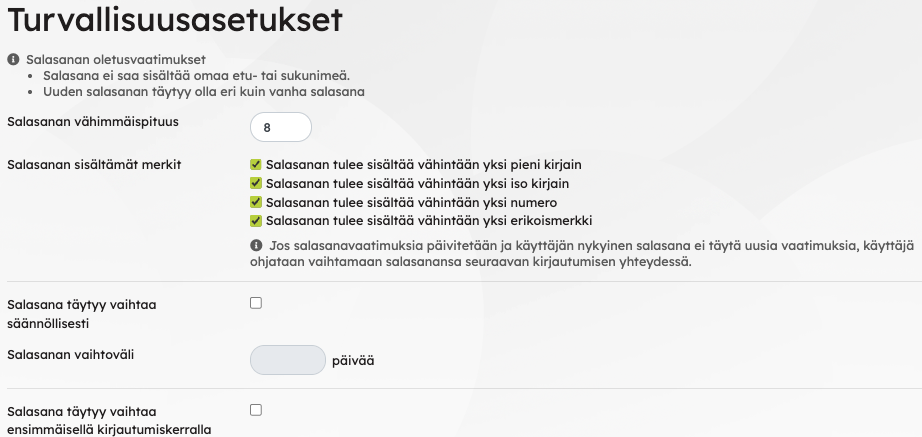
The image shows the Security Settings feature and the various options available within it.

Set your preferred extra requirements

Password minimum length and other password requirements:

  • Minimum password length can be 8–24 characters.
  • Password must contain a minimum of one lowercase letter.
  • Password must contain a minimum of one uppercase letter.
  • Password must contain at least one number.
  • Password must contain a minimum of one special character.

You can set a password change interval (minimum 30 days). The first interval starts from the account creation date.

You can also require users to change their password on first login. If enabled, users are immediately taken to the password change screen after logging in for the first time. After setting a new password, they must log in again with the new password.

If password requirements are updated and a user’s current password does not meet the new requirements, the user will be prompted to change their password at the next login.

 
    Environment administration
  • + General instructions
    • Environment's tests and question databases
    • Notification texts
    • Priima Helpdesk
    • Image guidelines
    • Priima support services
    • Integrations
    • Service documentation
    • Release notes
    • Frequently Asked Questions
  • + Courses
    • Task templates
    • Using H5P Assignments in the Environment
    • Sharing courses
    • LTI 1.3 tools
    • Events
    • Recommendations
    • Learning path administration
    • Course types
    • Color themes
    • Certificates
    • Open badges
    • LTI tools (versions 1.0 and 1.1)
    • Course feedback
    • Grading
    • Courses and course templates
  • + Users
    • Activating an expired user account
    • Creating an account
    • Creating a user account
    • Creating a user account
    • Creating a user account
    • Creating a user account
    • Account validity and deletion
    • Users
    • Edit and delete multiple accounts
    • Account deletion
    • Accounts which are no longer valid
    • Choosing landing page for a group
    • Adding manager information
    • Dynamic groups
    • Permission levels
    • Groups
    • Roles
    • Terms of Use
    • User data fields
    • Create multiple accounts at once
  • + Environment statistics
    • Usage
    • Statistics
  • + Environment
    • Security settings
    • Search engine optimization of the login page
    • Start pages
    • Priima Switch: Priima as LTI Tool Provider
    • Emails sent by Priima
    • Chat Messages and eMail Reminders
    • Embedding content
    • Layout settings
    • Tags
    • Environment settings
  • + login
    • Tax number registration
    • SSO login
    • Login page settings
    • Valtticard login
    • Strong authentication
    • External login methods
    • Registration
    • Login page announcements